

As fleet managers seek to optimize efficiency, tracking platforms serve up a myriad of data for in-depth insight into fleet health. At the same time, it becomes challenging to turn this information into meaningful insights. The data has to be presented in an easy-to-use format.
3Dtracking’s platform includes vehicle maintenance features that support fleet managers in their quest to streamline fleet efficiency and maximize vehicle longevity.
Vehicle Dates and Distances
Vehicle longevity relies on regular, comprehensive maintenance schedules. Through 3Dtracking’s platform, service dates can be set up using odometer or important date settings – linking specific service types (e.g., oil filter, cambelt changes, etc.) to specific readings or when an important maintenance action must be taken. The result is efficiently managed schedules, so vehicle maintenance isn’t missed or forgotten.
Alerts
Maintenance alerts can be set up to align with specific triggers such as odometer readings or important dates. Alerts are quick and easy to set up on the 3Dtracking platform to make sure fleet maintenance is proactive. Watch the video to see how:
Action lists for alerts and vehicles
Once an alert is triggered, 3Dtracking’s platform can be configured to prompt action(s) to make sure specific activities occur. Users can set up a specific checklist template to activate what needs to be completed on a vehicle (e.g., a service checklist) once an alert is triggered. Set up is quick and easy. Watch the video to see how:
Consumables
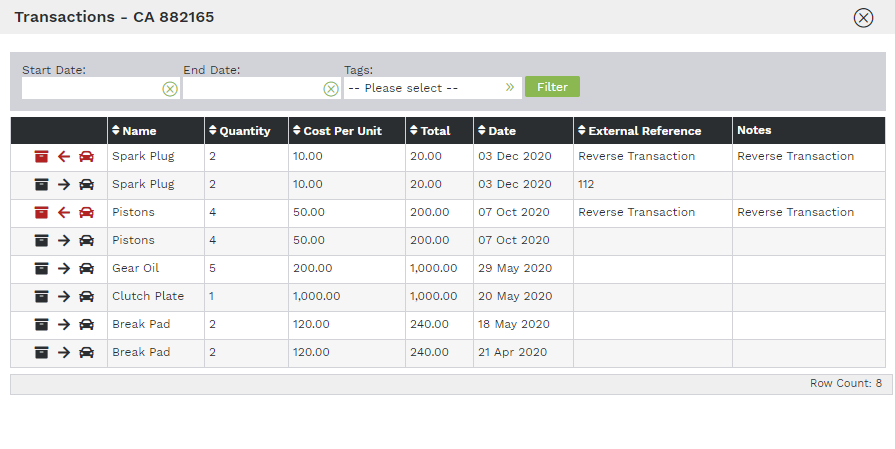
Much like an inventory system, consumables can be allocated to specific vehicles. When stock is ordered, 3Dtracking’s consumable feature records supplier details, date of receipt, and vehicle allocation. Fleet managers also have an always-on view of stock in store.
Journal
Like an electronic filing cabinet, 3Dtracking’s journal feature offers an easy way to systematically group information related to fleet management. Multiple entries per vehicle can be created, and it also allows for date entries and attachments (e.g., photos of an accident to be added to an Accident folder). Watch the video to see how this vehicle maintenance feature works:
DTC
Diagnostic trouble codes (DTCs) are generated when a vehicle’s on-board diagnostic system (CanBUS or OBD) picks up a problem, and flashes a warning light or indicator on the instrument panel. Rather than relying on drivers to inform managers of any vehicle warnings, 3Dtracking’s platform gives fleet managers an instant view of vehicle health.
For fleet managers, this integration can provide immediate business value through:
- Proactive maintenance and scheduling
- Prevention of dangerous accidents, e.g., warning of potential brake failures
- Tracking ongoing vehicle issues
Users can also receive real-time alerts via email and SMS when DTC warnings are triggered, along with immediate access to a detailed report with a full history of all reported DTC warnings. Watch the video to learn how DTC integration delivers value:
Contact us now for a demo of our easy-to-use fleet management platform.